Regular Expressions in Python

Regular Expression Knowledge
When writing programs to process strings, we often encounter the need to find strings that match certain rules in a piece of text. Regular expressions are tools used to describe these rules. In other words, we can use regular expressions to define string matching patterns, that is, how to check whether a string has parts that match a certain pattern, or extract parts that match the pattern from a string, or replace them.
To give a simple example, if you have used file search in Windows operating system and used wildcards (* and ?) when specifying file names, then regular expressions are similar tools for text matching, except that regular expressions are more powerful than wildcards. They can describe your needs more precisely, and of course the price you pay is that writing a regular expression is much more complex than using wildcards, because anything that brings you benefits requires you to pay a corresponding price.
To give another example, we obtained a string from somewhere (it could be a text file or a piece of news on the Internet) and want to find mobile phone numbers and landline numbers in the string. Of course, we can assume that mobile phone numbers are 11-digit numbers (note that they are not random 11-digit numbers, because you have never seen a mobile phone number like “25012345678”), and landline numbers are in a pattern like “area code-number”. If you don’t use regular expressions, completing this task will be quite troublesome. Initially, computers were created to do mathematical calculations and processed information that was basically numerical. Today, much of the information we process in our daily work is text data. We want computers to recognize and process text that matches certain patterns, and regular expressions become very important. Today, almost all programming languages provide support for regular expression operations. Python supports regular expression operations through the re module in the standard library.
For knowledge related to regular expressions, you can read a very famous blog post called Regular Expressions in 30 Minutes. After reading this article, you will be able to understand the following table, which is a brief summary of some basic symbols in regular expressions.
| Symbol | Explanation | Example | Description |
|---|---|---|---|
. | Match any character | b.t | Can match bat / but / b#t / b1t, etc. |
\w | Match letter/digit/underscore | b\wt | Can match bat / b1t / b_t, etc. But cannot match b#t |
\s | Match whitespace characters (including \r, \n, \t, etc.) | love\syou | Can match love you |
\d | Match digits | \d\d | Can match 01 / 23 / 99, etc. |
\b | Match word boundary | \bThe\b | |
^ | Match start of string | ^The | Can match strings starting with The |
$ | Match end of string | .exe$ | Can match strings ending with .exe |
\W | Match non-letter/digit/underscore | b\Wt | Can match b#t / b@t, etc. But cannot match but / b1t / b_t, etc. |
\S | Match non-whitespace characters | love\Syou | Can match love#you, etc. But cannot match love you |
\D | Match non-digits | \d\D | Can match 9a / 3# / 0F, etc. |
\B | Match non-word boundary | \Bio\B | |
[] | Match any single character from character set | [aeiou] | Can match any vowel character |
[^] | Match any single character not in character set | [^aeiou] | Can match any non-vowel character |
* | Match 0 or more times | \w* | |
+ | Match 1 or more times | \w+ | |
? | Match 0 or 1 time | \w? | |
{N} | Match N times | \w{3} | |
{M,} | Match at least M times | \w{3,} | |
{M,N} | Match at least M times and at most N times | \w{3,6} | |
| | Branch | foo|bar | Can match foo or bar |
(?#) | Comment | ||
(exp) | Match exp and capture to automatically named group | ||
(?<name>exp) | Match exp and capture to group named name | ||
(?:exp) | Match exp but do not capture matched text | ||
(?=exp) | Match position before exp | \b\w+(?=ing) | Can match danc in I’m dancing |
(?<=exp) | Match position after exp | (?<=\bdanc)\w+\b | Can match the first ing in I love dancing and reading |
(?!exp) | Match position not followed by exp | ||
(?<!exp) | Match position not preceded by exp | ||
*? | Repeat any number of times, but as few as possible | a.*ba.*?b | Applying the regex to aabab, the former will match the entire string aabab, the latter will match aab and ab |
+? | Repeat 1 or more times, but as few as possible | ||
?? | Repeat 0 or 1 time, but as few as possible | ||
{M,N}? | Repeat M to N times, but as few as possible | ||
{M,}? | Repeat M or more times, but as few as possible |
Note: If the character you need to match is a special character in regular expressions, you can use
\for escaping. For example, if you want to match a decimal point, you can write it as\., because writing.directly will match any character. Similarly, if you want to match parentheses, you must write them as\(and\), otherwise the parentheses are treated as groups in regular expressions.
Python Support for Regular Expressions
Python provides the re module to support regular expression-related operations. Below are the core functions in the re module.
| Function | Description |
|---|---|
compile(pattern, flags=0) | Compile regular expression and return regular expression object |
match(pattern, string, flags=0) | Match string with regular expression, return match object on success, otherwise return None |
search(pattern, string, flags=0) | Search for first occurrence of regular expression pattern in string, return match object on success, otherwise return None |
split(pattern, string, maxsplit=0, flags=0) | Split string using pattern specified by regular expression, return list |
sub(pattern, repl, string, count=0, flags=0) | Replace patterns matching regular expression in original string with specified string, can specify number of replacements with count |
fullmatch(pattern, string, flags=0) | Full match version of match function (from start to end of string) |
findall(pattern, string, flags=0) | Find all patterns matching regular expression in string, return list of strings |
finditer(pattern, string, flags=0) | Find all patterns matching regular expression in string, return an iterator |
purge() | Clear cache of implicitly compiled regular expressions |
re.I / re.IGNORECASE | Case-insensitive matching flag |
re.M / re.MULTILINE | Multiline matching flag |
Note: The functions in the
remodule mentioned above can also be replaced by methods of regular expression objects (Patternobjects) in actual development. If a regular expression needs to be used repeatedly, it is undoubtedly a wiser choice to first compile the regular expression through thecompilefunction and create a regular expression object.
Below we will show you how to use regular expressions in Python through a series of examples.
Example 1: Verify whether the input username and QQ number are valid and give corresponding prompts.
"""
Requirements: Username must consist of letters, digits or underscores and be 6-20 characters long, QQ number is 5-12 digits and the first digit cannot be 0
"""
import re

username = input('Please enter username: ')
qq = input('Please enter QQ number: ')
# The first parameter of the match function is a regular expression string or regular expression object
# The second parameter of the match function is the string object to match with the regular expression
m1 = re.match(r'^[0-9a-zA-Z_]{6,20}$', username)
if not m1:
    print('Please enter a valid username.')
# The fullmatch function requires the string to completely match the regular expression
# So the regular expression does not have start and end symbols
m2 = re.fullmatch(r'[1-9]\d{4,11}', qq)
if not m2:
    print('Please enter a valid QQ number.')
if m1 and m2:
    print('The information you entered is valid!')
Tip: When writing regular expressions above, we used “raw string” notation (adding
rbefore the string). A “raw string” means that each character in the string has its original meaning. To put it more directly, there are no so-called escape characters in the string. Because there are many metacharacters and places that need to be escaped in regular expressions, if you don’t use raw strings, you need to write backslashes as\\. For example,\drepresenting digits must be written as\\d, which is not only inconvenient to write but also difficult to read.
Example 2: Extract domestic mobile phone numbers from a piece of text.
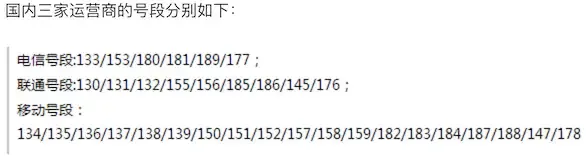
The following figure shows the mobile phone number segments launched by the three domestic operators as of the end of 2017.
import re

# Create regular expression object, using lookahead and lookbehind to ensure no digits should appear before or after the phone number
pattern = re.compile(r'(?<=\D)1[34578]\d{9}(?=\D)')
sentence = '''Important things are said 8130123456789 times, my phone number is 13512346789 this lucky number,
not 15600998765, nor 110 or 119, Wang Dachui's phone number is 15600998765.'''
# Method 1: Find all matches and save to a list
tels_list = re.findall(pattern, sentence)
for tel in tels_list:
    print(tel)
print('--------Gorgeous divider--------')

# Method 2: Get match objects through iterator and get matched content
for temp in pattern.finditer(sentence):
    print(temp.group())
print('--------Gorgeous divider--------')

# Method 3: Find all matches by specifying search position through search function
m = pattern.search(sentence)
while m:
    print(m.group())
    m = pattern.search(sentence, m.end())
Note: The regular expression for matching domestic mobile phone numbers above is not good enough, because numbers starting with 14 are only 145 or 147, and the above regular expression does not consider this situation. To match domestic mobile phone numbers, a better regular expression would be:
(?<=\D)(1[38]\d{9}|14[57]\d{8}|15[0-35-9]\d{8}|17[678]\d{8})(?=\D). It seems that there are already mobile phone numbers starting with 19 and 16 in China, but this is temporarily not in our consideration.
Example 3: Replace inappropriate content in strings
import re

sentence = 'Oh, shit! Are you stupid? Fuck you.'
purified = re.sub('fuck|shit|stupid|idiot',
                  '*', sentence, flags=re.IGNORECASE)
print(purified)  # Oh, *! Are you *? * you.
Note: The regular expression-related functions in the
remodule all have aflagsparameter, which represents the matching flags of regular expressions. Through this flag, you can specify whether to ignore case when matching, whether to perform multiline matching, whether to display debugging information, etc. If you need to specify multiple values for theflagsparameter, you can use the bitwise OR operator to stack them, such asflags=re.I | re.M.
Example 4: Split long strings
import re

poem = 'Moonlight before my bed, like frost on the ground. I raise my head to see the moon, lower it thinking of home.'
sentences_list = re.split(r'[,.]', poem)
sentences_list = [sentence for sentence in sentences_list if sentence]
for sentence in sentences_list:
    print(sentence)
Summary
Regular expressions are really very powerful in string processing and matching. Through the above examples, I believe everyone has already felt the charm of regular expressions. Of course, writing a regular expression is not so easy for beginners, but many things come with practice. Just be bold and try. There is an online regular expression testing tool that I believe can help you to a certain extent.